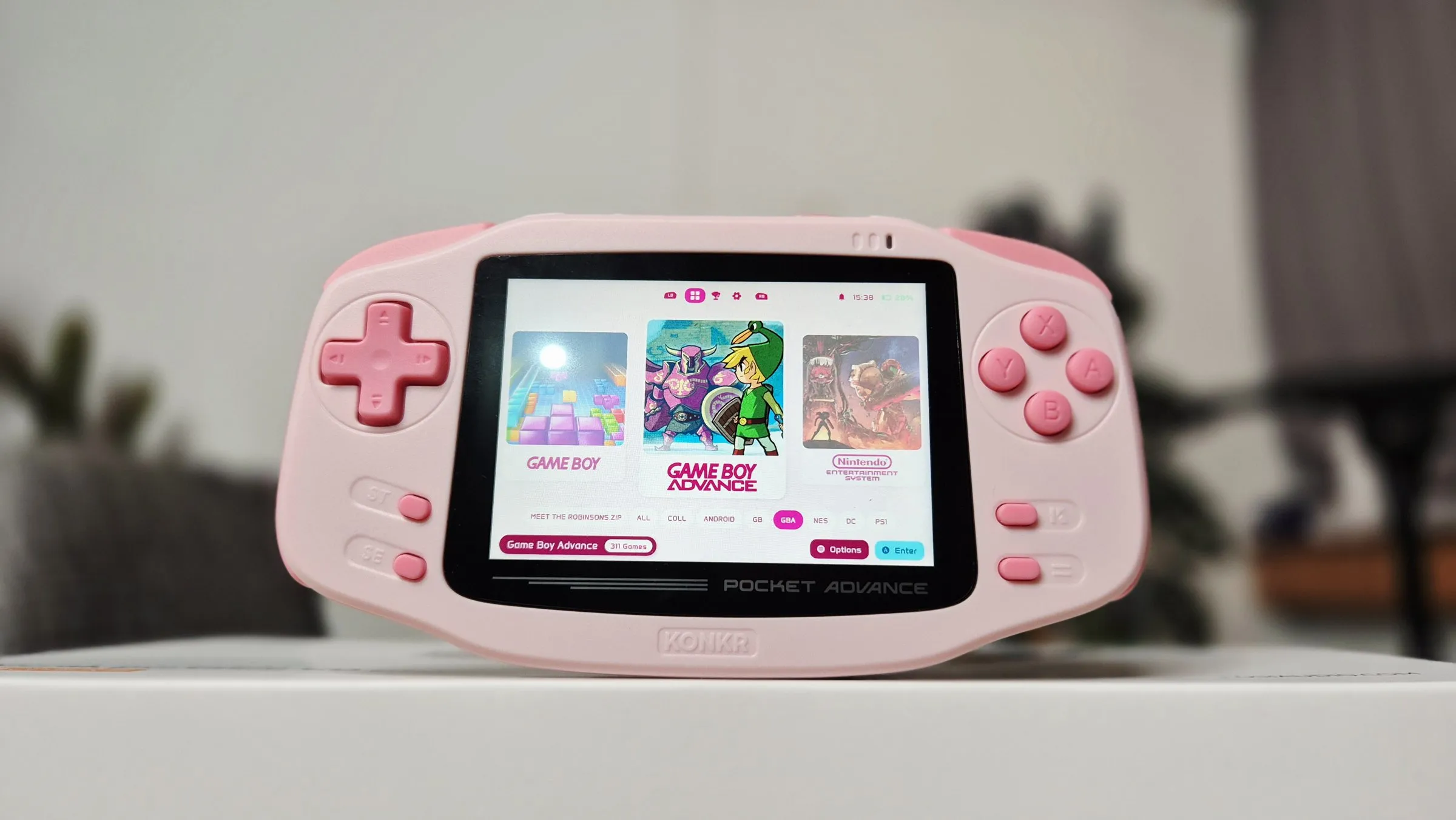
Let’s address the elephant in the room right away: it is pink. Not peach, definitely not a subtle neutral—it is a glorious, unabashedly pink handheld [00:00]. But once you get past the color, the real question is whether Ayaneo’s budget-focused brand, Konkr, managed to pull off a worthy successor to the nostalgic horizontal form factors we grew up with.
After spending quality time setting it up, configuring RetroArch, and testing everything from classic Game Boy Advance titles to media playback, here is my full verdict on the Ayaneo Konkr Pocket Advance.
First Impressions & Build Quality: They Nailed the Design
Taking a tour around the device, the resounding takeaway is simple: they nailed it [01:45].
While Konkr sits as the budget arm of Ayaneo—meaning the plastics feel a bit more “Tupperware-like” compared to high-end flagship devices [01:50]—these chunky, textured plastics are fantastic [02:07]. The side plastic inserts provide a great, grippy feel, the rubbery SD card door is well-implemented, and the speaker grills look clean [02:07].
And let’s talk about the controls:
- The Volume Wheel: As the good Lord intended, we have a stock-standard, grippy mechanical volume wheel [02:35]. No mushy buttons, no awkward rocker—just a proper wheel.
- The D-Pad and Buttons: Unlike some of Ayaneo’s previous compact units where the D-pads felt questionable, the D-pad here is excellent [22:19]. It handles rolling inputs cleanly without ghosting. The action buttons feature short-travel soft rubber membranes that feel great under the thumb [03:07].
- The Ergonomics: They effectively cloned the classic Game Boy Advance vibe, but improved it with a comfortable wraparound design [28:49]. The curves are softened, making it better looking than the original in my opinion [29:18].
My only minor layout gripe? The start, select, and Android menu buttons drop a diagonal grid pattern and then abruptly go straight, which might tweak anyone with a bit of design OCD [30:04]. Also, while the speakers sound surprisingly decent with boosted high-ends and zero distortion at maximum safe volumes, they are still bottom-firing [30:28]. Front-firing speakers will always win, but what we have here is clean enough for daily handheld gaming.
Screen & Display Performance
The device features a 3.5-inch 3:2 aspect ratio screen running at a crisp 960x640 resolution [22:50].
- The Aspect Ratio: A 3:2 screen is an absolute game-changer because it provides a pixel-perfect integer scaling zone for Game Boy Advance titles [26:11]. Fire up an LCD grid shader or GBA color filter, and GBA games look drop-dead gorgeous [27:02].
- Brightness: This screen gets crazy bright [24:40]. Even on its lowest manual settings in a dim room, it’s quite punchy, so I’d love to see a future firmware update introduce an “extra dim” DC-dimming mode for late-night bed sessions [24:51].
- UI Scaling: Because Android’s default menus and some frontend elements aren’t fully optimized for a 3.5-inch panel, text and system tabs can feel quite tiny out of the box [11:43].
Under the Hood: Performance & Chipset
Powered by the MediaTek Helio G90T [20:53], the Pocket Advance handles its target emulation libraries brilliantly:
- Flawless Execution: 8-bit and 16-bit systems (NES, SNES, Game Boy, Game Boy Color, Game Boy Advance, Neo Geo, and Sega Mega Drive) run without breaking a sweat [21:16].
- 3D & Higher-End Systems: PlayStation 1 runs effortlessly, Sega Dreamcast performs admirably, and you can get solid 2x upscaling on PSP titles [21:29]. Naturally, heavier 3D systems like N64, GameCube, and PS2 will push the chip past its comfort zone, but lighter titles remain playable [21:49].
Software Setup: Taming Android
Android on a retro handheld can occasionally be a headache to configure from scratch, but leaning on lightweight frontends makes all the difference:
- Frontend Choice: I opted to use Neostation as my dedicated home launcher [15:17]. It’s open-source, lightweight, and automatically indexes your ROM directory structures without demanding endless configuration overhead [08:40].
- RetroAchievements: Integrating RetroAchievements is straightforward—just grab your API key from the website, paste it in, and your badges and progress track seamlessly within your library [10:10].
- Custom Shortcuts: One of my favorite quality-of-life adjustments was mapping the customizable side buttons (LC and RC) directly to screen brightness controls [26:26]. Being able to adjust brightness instantly without dragging down the Android notification shade saves a ton of friction.
Battery-wise, the 4,000 mAh cell paired with an efficient chipset and eco-performance modes means you can sip battery power and game for hours on end [35:11].
Final Thoughts
At first, I wasn’t entirely sure what to expect from a pink, budget-tier horizontal handheld from Konkr. But the more I used it, the more it grew on me.
It is stunningly designed, features an incredible 3:2 screen tailored specifically for the greatest gaming system of all time (the GBA) [26:11], and offers a tactile, premium hand-feel that punches well above its price class. If you are willing to spend an hour setting up your frontend and RetroArch parameters, the Ayaneo Konkr Pocket Advance is an absolute treat for retro enthusiasts who love a bit of style with their nostalgia.
Watch the full video review: