Why DAPs?
Remember the days of the iPod? It was 2001. I turned 21 that year. I can still remember it. I was poor, and the closest I could get to an iPod was painting my Casio portable CD player white, dealing with the lack of shockproofing, and pretending the song I was listening to didn’t s-nd l-ke -is.
But now I am a wealthy YouTuber swimming in pools of AdSense money, so I can afford an iPod. Sadly, they no longer exist, and instead I have DJ X telling me he’s got exactly what I want to listen to today. Except he doesn’t, because my teenage daughter is going through a metal phase, and songs I actually like, such as Lizzy McAlpine’s “Pushing It Down and Praying”, are interspersed with songs about mother-f***ers and some guy who really thinks I suck… at least, that’s what I’m telling myself he’s saying.
But I digress. My point is, there are moments in tech history that are worth revisiting and even reviving. And while the digital audio player will never return to its glory days, there is definitely a new interest in simplifying the music listening experience, a renewed interest in wired headphones, and a rising tide of homebrew software thanks to AI coding.
All of this coalesces into a nexus of awesomeness that would make 21-year-old me go, “Ugh, that’s cool, but I have no money.”
General impressions and gripes
Fosi got hold of me a while ago with their viral gadget, the MagSafe CD player that exposes your CD and boasts being the most compact CD player around. While it was gimmicky, I was impressed by Fosi’s balance between affordability and a desire to produce a decent audio product. Incidentally, they have also sent me their Merak, which is a more serious CD player and will get its own video, since CDs and CD players are very special to me. But here you can really see their passion shine through.
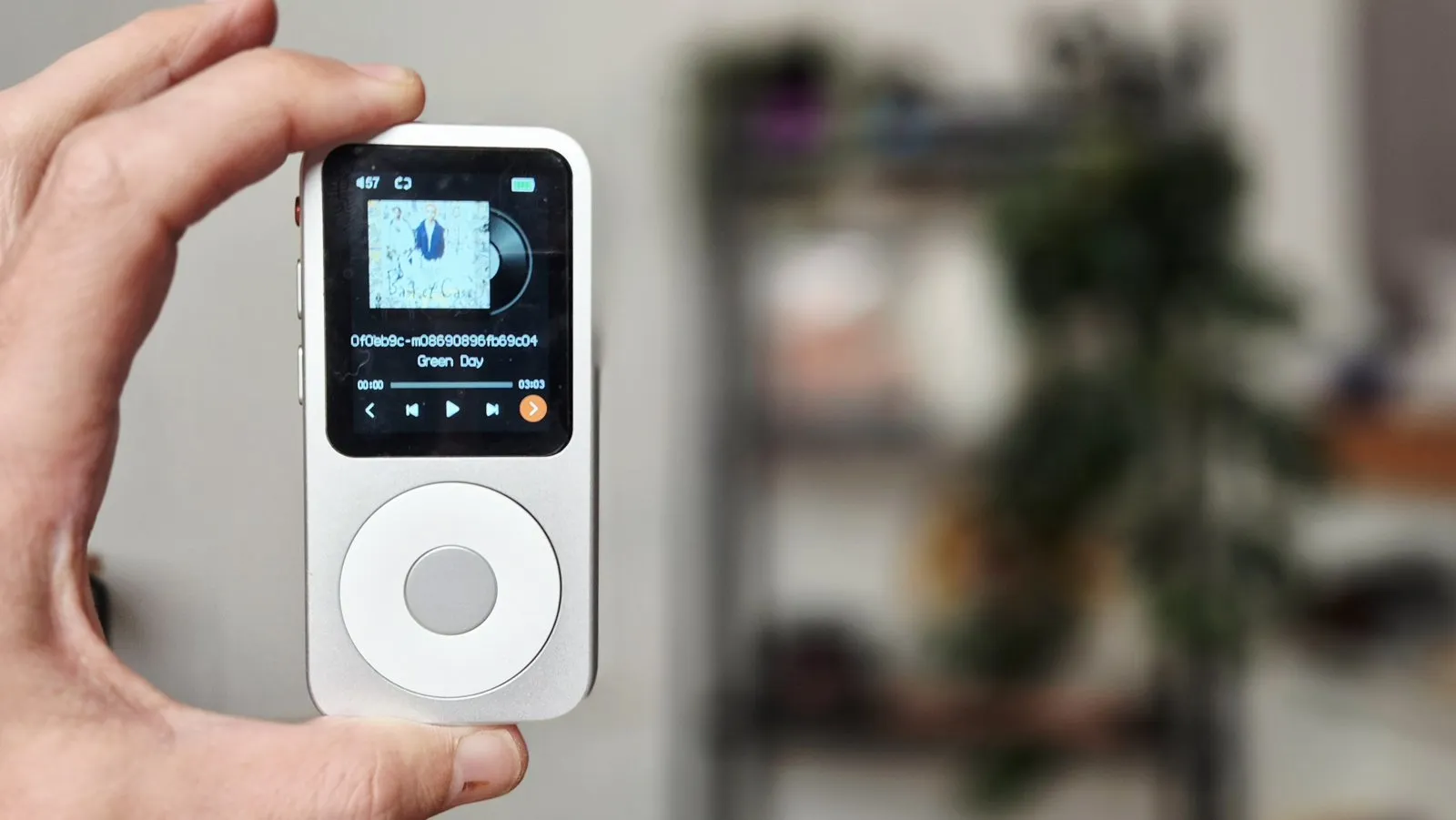
The DAP Neo carries on with this ethos. In fact, Fosi is doubling down on the concept in their marketing and calling it Fosi MOMENT, leaning into the fact that they are focused on capturing the nostalgic feeling of those moments in tech we have lost that are worth reviving. That CD player does it so well. With the DAP Neo, they have gone with an eye-catching iPod look that sparks that great 2000s nostalgia, but they have also followed through with a good DAC chip.
The DAC chip at a glance
- About 120 dB dynamic range and roughly −107 dB THD+N, which is better than you can hear.
- PCM up to 32-bit/384 kHz, and DSD up to DSD256 (native or DoP, depending on the implementation).
- Low power draw, which is why it’s common in USB dongles, phones and portable players.
It has a low-res but vibrant screen, and most of the body is aluminium, which keeps that iPod vibe (it also comes in black or obsidian). The matte plastic back inlay has a clear overlay that gives it a high-end look and feel. It relies on an SD card for storage; Fosi supplies a 16 GB card to get you started, it can handle up to 64 GB, and there’s a 12-hour battery life to get through all that music. At the bottom we have the USB-C port, a reset pin button and the 3.5 mm jack. While I can’t confirm the quality of the jack, the DAP plays FLAC and WAV files up to 24-bit/192 kHz.
Supported formats: MP3, FLAC, WAV, APE, M4A, DSD
Bluetooth is the weak point on this DAP, with only the SBC codec, which is the lowest-quality codec. It does stream at up to 512 kbps, though, so if you’re not fussy about this you’ll be fine. Another gripe some may have is that there is no gapless playback. This is common in cheaper DAPs, but it does suck if you want to listen to albums with a strong flow, which is typical of ’90s and 2000s albums.
Bluetooth
So let’s focus on Bluetooth for a second. Firstly, Fosi claims it connects to AirPods, which I would confirm before buying. I have asked Fosi about this, because I can’t find any reviewers who have confirmed it, and I’ll update this article when they get back to me. Just to reiterate: this is not a high-end Bluetooth experience. That said, SBC is more than adequate for most listening needs. However, if you have invested in very expensive Bluetooth headphones that can handle LDAC, you’re not going to get the most out of them with this.
USB-C DAC test
Interestingly, this unit gives you the option to choose USB audio when you plug it in. On my computer it registers as an audio output, like a sound card, so you could use it with a Mac that doesn’t have a 3.5 mm headphone output, or with your phone. But the real-world use is for USB-C headphones, and for that it works perfectly.
Controls and navigation
Here’s where things get very iPod Shuffle-y. Although we don’t have voice prompts like the Shuffle had, we do have a button learning curve:
- In the menu: single press selects, double press goes back and triple press goes home.
- While music is playing: single press is play/pause, double press skips to the next track and triple press skips to the previous track. That’s a bit confusing, since double press means back in the menu.
And now on to the party trick, which is actually where the DAP Neo shows its budget consciousness the most. Fosi kind of set themselves up for a disappointing reaction here, because as much as you tell yourself this device costs way less than an iPod, the iPod’s click wheel was one of the most over-engineered features in tech history. There’s no subtle clickiness here, just the tactile clicks built into the wheel, which is nothing like the iPod’s wheel. It sticks a bit at times, and you can struggle to gain traction with it.
I say this not to put the product down but to set your expectations, because the wheel has actually loosened up over time (though I think I’ve also just gotten used to it). It does the job nicely, leans into a bygone era of click wheels and interacts with the UI well, like making you rotate the wheel as the time fills with colour to unlock the device.
User interface
That brings me to the UI, which only has one or two quirks. This is often where you can tell if a company rushed a product, and Fosi did not. The rotate-to-unlock feature alone shows a moment of thoughtfulness from the devs. There are plenty of useful categories to help you find what you’re looking for. Everything is text, and you only see album art once you open a song.
I actually only have two gripes here, and I think these were issues on the iPod too. In a song you can scroll between play and skip, and then there’s a second menu area where you can enable repeat or shuffle, add to a playlist (which is great), view lyrics if you have them set up, and see the metadata (which I also quite like). All of this can get a bit confusing, and the simplest solution is to press power to lock the device, then limit yourself to the single, double and triple click system and the volume buttons to navigate your songs. And this, I think, is more by design than a gripe.
The other little quirk is that once you exit the Now Playing screen, the only ways back are to either select that specific song again (selecting any other song will start playing that one instead) or press and hold to go home and then click on Now Playing. Again, it’s a quirk of the click wheel system, but I thought it was worth a mention.
Listening comparison with the Snowsky Echo
On to listening. There are reports of the audio on this not being very good, even wired. At first I thought there was a thinness to the audio, but with IEMs positioned nicely, the audio is great. In a comparison with the FiiO Snowsky Echo, which has a reputable audio chain, I struggled to hear the difference. Maybe there’s a slight thinness on the DAP Neo, but it’s not worth causing a scene on Reddit over.
A cool “iTunes” app I found for Linux
I want to close by talking about why this whole experience is worth looking into. There’s a lot to get into, actually. You could go full old school and get yourself a set of wired earbuds, like the old ones from when Noah and I would sit on the Ark, kicking it with a beer and some classic King David lute riffs shredding on the iPod as we gazed into the water-covered abyss. Or perhaps you want to go fancy with some high-end IEMs.
Then there are the file types. MP3s were all the rage back in the day, but now we have FLAC, which is lossless and can actually be a smaller file than a WAV. For me, it’s more about finding a way to get it all working that’s fun and nostalgic.
And so, literally today, I saw a notification on Linuxaudio about someone who AI-coded an iTunes-style desktop app for Linux and Mac called Chilpa. It’s so nice, and it feels like a better iTunes that’s geared specifically for an MP3 player in modern times. In short, I simply plug in my DAP Neo, sync my music and off I go. It keeps everything organised, and I get a top-shelf user experience.
Why you should get a DAP
Honestly, finding the Chilpa app has taken this whole thing to the next level. I have a lot of MP3s now from buying physical media from Amazon (in case you didn’t know, whenever you buy music from them you get MP3s you can download from Amazon Music), and it’s a really fun experience adding those MP3s, plus FLAC files from artists I love, to my library and having them all in one place.
You’ll be tempted to pirate, and that’s up to you, but the satisfaction of these limitations is what makes it so enjoyable. Not having the best IEMs, not obsessing over LDAC versus SBC, just popping in a few pieces of tech that spark joy and rediscovering an album like it’s the first time all over again.
I encourage you to do this. Limit yourself and buy a player that sparks joy. Maybe it’s not the DAP; maybe it’s a CD player like Fosi’s Merak. Detach yourself from limitless music. I promise you will have a very special experience.